Monday, March 28, 2016

Old Story - Worth Reading - How Hackable is Your Car?

If you drive a recent model car, you may wonder if your car is as hackable as some of the cars hacked during research to provide a proof of concept. In videos widely distributed, hackers were able to take control of cars remotely. Click the YouTube logo to see a sampling or watch the video below.

YouTube-Logo-2016-03-28-07-49.jpg

While we should not freak out yet, it is clear that there are weaknesses in the design of these automobiles. Conspiracy theories have flooded the net, but I would not worry too much. That being said, it is good to know what’s up.

Enjoy your week!

Friday, March 25, 2016

How JavaScript Got Broke!

Just outside of the last 7 days of March 2016, a crazy thing happened with JavaScript. A package manager tool called npm used by a majority of JavaScript developers for developing, testing and releasing their code stopped working. Oddly enough, the source of this broken tool was a tiny little function in GitHub called “left-pad” used for padding strings on the left side with other characters. This little component was a short 11 line file, so when the developer took it off GitHub, npm began to fail to work across the globe.

What’s GitHub?

GitHub is a popular web-based source control management (SCM) and version distribution tool. Since 2008 the platform has provided a place for developers across the planet to store source code for their applications, with support for all programming languages and additional features like issue tracking (bug reporting/management), application wikis, email notifications, Photoshop (PSD) storage and version comparison, project documentation storage and presentation and commit history. Users can request a “pull” from a project in order to split off open source projects to add their own code updates to the repository.

About npm

npm is the default package manager for Node.js, a popular JavaScript runtime environment.

Because npm is the packagers’ packager, and it is intended to encourage reuse of other software, the developers made use of the left-pad source code. As explained in this article over at the Verge, functions like left-pad are typically provided by the language authors, companies like Microsoft with C# and its full Visual Studio environment, and Apple with Objective-C and Swift, so the reliance on a simple string padding function from an individual is an oddity.

As npm has been widely adopted by developers everywhere because of the convenience it provides. Any user can publish their work via npm and you can add that work to your own apps. Likewise, if you write a clever routine and want to share it, all you do is upload to GitHub and publish it on npm for anyone else to include in their own projects.

What Happened

According to the Verge article, more than 2.5 million installs of left-pad occurred in the previous month! Developer Azer Koçulu of left-pad has written and published many sets of code to npm, which allows name allocation on a first-come, first-served basis. One project, named Kik, attracted attention recently when a lawyer for the company Kik (or a patent - troll? - agent according to that company) contacted Azer requesting the Kik package be removed immediately. When Azer failed to comply, Kik’s representatives reached out to npm and npm transferred ownership of the package name “Kik” to the Kik company.

Due to this, Azer decided he was not going to use npm any longer. Azer tells the story of “liberating” his modules in this post on Medium. In his post he states that he had to take a stand, removing all of his packages from npm, and that in the long run there will be an alternative developed by the open source community that doesn’t bend immediately to requests like what happened with his Kik package. He apologies to users of his code and tells them where to repoint their projects so they will run again.

With over 250 packages, Azer’s removal of the code will surely impact many developers (and users); however, it has already made a huge impact because of npm and a package called Babel, currently the most popular way to write in the language ES6 (the version of JavaScript created in 2015) to run on most of the latest browsers. Otherwise, the incomplete nature of browsers’ implementations of JavaScript would make using the newest features of JavaScript a difficult if not nearly impossible task.

Learn more at the Verge article and comment below - what do you think of this situation and how it shook the open source community in just a few hours?

Saturday, March 19, 2016

Android Danger: Stagefright Exploit Reliably Attacks Affected Phones

The Stagefright security flaw (link is Wikipedia), first reported July 2015, was largely resolved by Google by the release of Android 5.1 (“Lollipop”), but there are still plenty of smartphones in play that have the weakness. In fact, unlike iOS users, many owners of Android-based smartphones never (or very slowly) update the operating systems of their devices. Worse still, some phones, especially those targeted at low entry prices in the market, are not capable of updating. Here’s the kicker: not all versions of Lollipop have the fix. Unfortunately, manufacturers customize the operating systems for their own hardware and needs, with a large number of 5.1 smartphones subject to this exploit.

In the video below, researchers demonstrate a real-world implementation of the exploit called Metaphor.

This work was done by NorthBit, a software research company. A technical paper is available by clicking the Metaphor Stagefright exploit PDF link. If your smartphone is running an operating system version before 5.1, you may still be able to limit the impact of the issue with changes to your settings, or check this link to see if the Google patches released will work for you.

Holoportation - Coming Soon to a Location Not Near You

Teleportation. It’s a fantasy superpower right up there with flying, x-ray vision and invulnerability. Back as a child, reading the X-Men, I dreamed of what it would be like to BAMF into new locations as Nightcrawler does. Marvel’s comic book universe has so many characters with some type of teleportation power that Wikipedia lists 91 separate character pages with the ability. Shows like Heroes on TV and other comic publishers like DC comics have also prominently featured teleportation.

Microsoft’s Holoportation isn’t a superpower, but it is a great step forward in both augmented reality (AR) and virtual reality (VR) that gives users the visual experience of interacting with people and objects at a remove site. Using a unique camera configuration as shown in the video below, two users can interact in near real time with each other, seeing the “holoported” person in 3D via the VR display in their goggles.

How Does It Work?

Holoportation is made possible by Microsoft HoloLens, built on the Windows Holographic platform. This device, an AR/VR display inside a headset, is expected for release this week to developers at a cost of $3000. No timeline for consumer availability has been announced so far, but as kits like Google Cardboard have made the entry point for VR so low (you can build it for free using Google’s instructions), we now know that many current smartphones can provide enough processing power to smoothly render streaming 3D images. If the processing of the cameras is handled by a separate desktop (or laptop) computer, users might be able to use any phone capable of streaming Netflix movies. This means the technology required to achieve holoportation is many years old at this point and, depending on how Microsoft approaches it, could already be in the pockets and purses of a majority of smartphone users.

Learn more about holoportation by visiting the links below:

  1. Microsoft Holoportation
  2. Escapist Magazine
  3. HBO's Silicon Valley

What do you think? Is holoportation something you will find useful? If so, will it be more useful for your personal life or in your everyday professional experience?


Thursday, March 10, 2016

Official Relaunch of Tek Highlights!

Welcome back to the land of the living, right?

Please come back often for updates on your favorite technology topics including new (and upcoming) hardware/software, consumer electronics and even big deals so you can save on your Tek addiction!

For now, check out the cool products available at Amazon Launchpad, their incubator-like listing service that features products from such crowdfunding sites as Kickstarter.

amazon_launchpad_logo-head-2016-03-10-04-59.jpg

Thanks again for reading!

Thursday, September 25, 2014

Chromecast - just $15 + tax (with free s&h, after applying $10 coupon) right now via GROUPON

Are you on GROUPON? If not, use my referral code to signup https://www.groupon.com/visitor_referral/h/4086201d-fa6f-47a2-99ce-aa1457f2a2c5 (please use my code, I will love ya for the referral credit I receive) and get yourself a Chromecast refurbished unit for just $15 + tax (free S&H) after coupon by clicking the link below.

1tCyFmw-2014-09-25-10-20.png

https://www.groupon.com/deals/gg-1-google-chromecast-refurbished-2

Use one of these coupons at checkout to save $10 more:

HAPPY10 or 10FORU

The regular discounted price is $25 ($26 with tax) and free shipping. Use either of those coupon codes and you get it for $15 ($15.60 with tax in my state).

ENJOY!

(Note: Chromecast, to me, is not as good as the Roku Streaming Stick, of which I have two already, but for this price it's worth having a spare stick around - you could program it with your services and take it to a party to plug into the TV of a friend!)

Wednesday, May 14, 2014

That CD You Have Won't Work - Tales of Sorrow

So, you bought a CD burner when they first came out. Maybe it was like me, when they really first came out and they were over $1000 with each blank running $10-$15.

If you did, and you don't know what I'm about to tell you, you are going to be sad.

Your burned CDs are disintegrating. 

They won't play and there's no way to recover the data. Nope, no way to get that data back. I have CDs (and DVDs) from as recent as 2010 that are already unreadable. Placing labels on the discs seem to speed up the degradation, but not as much as writing with a sharpie does. A disc with no label beyond the factory stamp will break down, and the original estimates of 10 to 20 years archival storage were greatly exaggerated.

The Library of Congress has done some research, and unlike the problems with burned CDs, which tech geeks like me have known for years, the traditional "pressed" plastic factory CDs also have this trouble. In a test done by the LoC, twin copies of Paul Winter's Earthbeat were exposed to high heat and humidity for 500 hours to simulate aging. One copy was fine at the end of the test, but the other had oxidized to the point of being nearly clear! That clear copy had none of the material used for playback. None.


Even if you carefully stored your burned discs, chances are they will have difficulty being read in almost any drive. The formats have built-in error correcting code and applications like dvdisaster exist to augment recovery efforts. However, these ECCs are no help against high amounts of degradation. According to the report, even the lasers involved in burning a disc can impact the longevity of the resulting CD or DVD.

This is a gentle reminder that backups on hard disk, the cloud or even magnetic tape are needed if you truly need to have access to data for the longterm.

More can be read over at The Atlantic. Thanks to the always excellent Adrienne LaFrance for her superb reporting on this. Be sure to check her out on Twitter as well.


Sunday, November 24, 2013

Print What You Like

I’ve posted about this website in the past, but the way you can save paper is worth mentioning again.

Check out PrintWhatYouLike.com and consider using the browser bookmarklet to limit your output from webpages to just the content you want!

Tuesday, October 29, 2013

Shortcut Links for Other Browsers (Browser Shortcut Series Part Two)

Here are some handy links to lists of shortcuts for browsers other than Safari.

Chrome Shortcuts - Linux

Chrome Shortcuts - Mac

Chrome Shortcuts - Windows

Firefox Shortcuts

Internet Explorer 9 Shortcuts

Internet Explorer 10 Shortcuts

Internet Explorer 11 Shortcuts

Opera Shortcuts - Mac

Opera Shortcuts - Windows

If you want to get the best use of whatever browser you choose, be sure to look for tips and tricks via your favorite search engines and YouTube. You might be surprised to learn how much time you can save with a few keystrokes!

One bonus article -> shortcuts for Safari in iOS. This is new to iOS 7, so finally we get a little keyboard coolness on touchscreen devices.

Safari Favorites Bar - Making the Most of It (Browser Shortcuts Series Part One)

Safari Special Features for Mac Users

If you’re a regular user of multiple browsers like me, you probably know some of the really cool keyboard shortcuts that will save you time.
Anyone who has seen my browser screenshots has probably wonder what the odd bookmark bar links are on my browsers. For example, in this screenshot from Safari for Mac OS X 10.9:

PastedGraphic1-2013-10-29-08-41.png
You can see that I’ve got a collection of bookmarklets, really short bookmark names and even bookmark folders on my Safari bookmarks bar (now called the Favorites Bar, by the way).
Let’s explore some of these in detail in Part One of this series on browser shortcuts.

PastedGraphic2-2013-10-29-08-41.png

The Sidebar

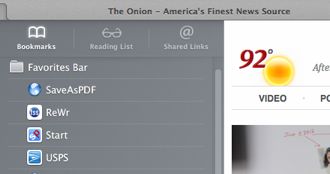
First, we have the bookmarks/reading list/shared links button. Clicking it opens the following sidebar:

PastedGraphic3-2013-10-29-08-41.png

You can choose from the Bookmarks, which actually lets you drill down into any of your bookmarks, not just the Favorites Bar. Next is the Reading List, a place for you to cache pages for offline reading later that will sync across iCloud to all of your devices running the latest Mac OS X and iOS operating systems. Here’s mine:

PastedGraphic4-2013-10-29-08-41.png

Finally is the Shared Links tab, a collection of links posted by your Twitter friends, if you have Twitter integration turned on for your Mac.

PastedGraphic5-2013-10-29-08-41.png

Top Sites

Next on our trip across the Favorites Bar, the little icon that looks like a grid of boxes:

PastedGraphic6-2013-10-29-08-41.png

Clicking this icon opens the Top Sites page in Safari, something that many people will see when they open a new tab or window (if they have Safari configured as such):

PastedGraphic7-2013-10-29-08-41.png

Top Sites is built around your most frequently-visited pages. You can right-click on any page image to delete it and the grid will get another page added to make the total number of pages match the number you have set for Top Sites on the General tab of Safari’s preferences. You can also right-click and choose the pin icon to make a page stay in Top Sites regardless of the frequency you visit it. Blue pin means “pushed” and gray pin means not pushed (not selected). Pressing CMD + R will reload all of the top sites’ page content in this view.

Bookmarklets

The next button is SaveAsPDF. The reason I frequently leave spaces out or heavily abbreviate words in these Favorites Bar items is that I want to make maximum use of the Favorites Bar real estate. One type of bookmark that has been popular since the early evolution of JavaScript is called a bookmarklet. Here is a great article from the folks at lifehacker showing how to add bookmarklets to iOS devices. This is very helpful since Safari on iOS doesn’t support extensions!

The bookmarklet “SaveAsPDF” is actually for iOS, since printing to PDF is a built-in function in Mac OS X anyway. If you have a task that is repetitive or one that would normally require a browser add-in, extension or other special plug-in, you might find a solution via bookmarklet and that is extra handy if you put it on the Favorites Bar where it is a click OR shortcut key away from action.

Wait, did I just say shortcut key? I’m glad you asked! Yes I did. Let’s continue on by skipping the ReWr link (it’s a custom link for a client’s Magento system that would bore you to read about).

Shortcut Keys for the Favorites Bar

Built into Safari is a cool way to get to the first shortcuts on your Favorites Bar. Starting after the sidebar and Top Sites icons, each of the next nine (9) bookmarks can be accessed by pressing CMD + the number. Let’s look at my Favorites Bar again.

PastedGraphic8-2013-10-29-08-41.png

So, using this system, we can see that CMD (⌘) symbol plus the following numbers gives us:
  1. SaveAsPDF (bookmarklet for iOS devices, I sync my bookmarks across all Macs, my iPad and iPhone)
  2. ReWr (again, this is a shortcut for rapid entry of Magento changes for a client of mine)
  3. Start (StartPage.com the world’s most private search engine)
  4. USPS (Postage Price Calculator, perfect for my eBay business)
  5. Tw (Twitter homepage)
  6. CNN (Cable News Network)
  7. BLN (Blacklisted News, usually carries the actual news as opposed to the filtered CNN news. Note: beware of ads for survivalist stuff LOL)
So, pressing ⌘ + 4 on my Safari jumps straight to the United States Postal Service Postage Price Calculator. A little easier than moving a mouse to click and a lot easier than moving a mouse to go to the bookmarks menu.

All Safari Keyboard Shortcuts

For users still on Mountain Lion or earlier releases of Safari, use the appropriate link below to give the shortcut list for your version.

Safari Shortcuts for iOS 7

Enjoy your browsing and be sure to check out my Apple blog, Knowing Apple... Tips, Tricks, News and Information if Apple is your platform of choice!

Other Links:

Mavericks Feature Focus: Safari 7 and iCloud Keychain
58 Useful Keyboard Shortcuts for Safari


Friday, October 11, 2013

Big Chrome Cache Issue - Personal Data Exposed!

Google Chrome’s cache exposes personal data in a way that is easily accessible by hackers, according to a report from data management firm Identity Finder.

This is one of the first problems of this type revealed for Chrome, although flaws in many browsers have been reported over the years, including some vulnerabilities that are still not widely patched in Internet Explorer.

History-Contents-2013-10-11-07-34.png

Monday, September 23, 2013

Users of Visual Studio, Rejoice? Yes, REJOICE!

There are tons of great IDE tools for all kinds of programming, everything from odd ball power apps like RazorSQL and Espresso to the standard IDEs used by everyone like Eclipse and Visual Studio 2013. I am always pleased when people (especially open source groups) create solutions that out perform these mainstream tools and I’m also excited when we get new options in the forms of plugins and extensions for commercial products.

Telerik Icenium is one such option. The folks at Telerik have come up with a tool, Icenium, that goes right into Visual Studio and can be used for construction of hybrid apps for iOS and Android. Subscriptions vary, with a free trial available and developer subscriptions from $16/month paid annually on up to $79/month paid annually for the full suite of features and unlimited personal support tickets.

PastedGraphic-2013-09-23-12-15.png

Check it out and see if this might be a useful tool for you!


Saturday, September 7, 2013

Building Your Own PC or Hackintosh (and recommended off-the-shelf Hackintosh Laptops)

Want to build a new PC? Want a Hackintosh?

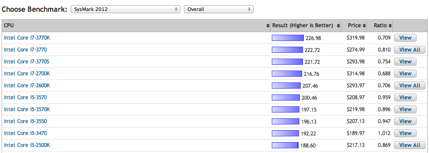
The website PCPartPicker makes that easier than ever. With all of the parts you can imagine and benchmarks for quite a few CPUs, this website takes the guesswork out of assembling your own new rig!

PastedGraphic-2013-09-7-19-27.png

For Hackintosh fans, there are a number of excellent choices. Here’s an article from last year on editing raw video with a $900 Hackintosh as compared to a $5000 Mac Pro.

If you are interested in converting a Windows laptop to a Hackintosh, the HP 4x30s and HP 4x40s make perfect options. The HP ProBook 4540 is available from Amazon here and is pictured below.

41oYjItF5oL._SX385_-2013-09-7-19-27.jpg

A couple of suggestions for your new computer:

  • SSD is the way to go, especially for a computer you hope to use for a year or more
  • Get the best CPU you can afford. With the right CPU, you can always upgrade your motherboard and RAM for better performance. I built a new PC for a relative last Christmas using the quad core CPU I’d initially used in the last computer I build for her a full 4 years earlier.

Remember, there are tons of forums that can make building a PC -- even your first -- a worry-free and fun project.

Saturday, August 31, 2013

A little off topic: PRICE MATCHING and saving $$$

Technology products often vary in price GREATLY. You can find price differences of 10% to 30% pretty easily just by searching large online retailers like Amazon, but finding items on clearance, refurbished or simply with open boxes can increase your savings to as much as 80%!!

Especially competitive prices can be found searching Amazon’s open box area, or visiting old-school locations of stores like Target that discount items on clearance very heavily because they want to open up space for newer products (or ones that sell more frequently or at a better profit margin).

Here are some helpful links for savvy shoppers:

As retailers go, Target and Walmart offer the best overall price matching programs. Target matches some online retailers, including Amazon; however, they are inconsistent (at best) on local price matches, including their own other locations. Walmart on the other hand offers matches often without even bringing the ad with you. Note: Walmart may call to verify the prices, especially on huge discounts.


Tuesday, August 13, 2013

NirSoft Utilities

Applications by NirSoft are tricks of the trade for Windows IT professionals, with applications designed to help you recover lost passwords, monitor resources including your network utilization, CPU and more.

The latest release, EventLogSourcesView makes much more effective use of Windows event logs a breeze for even beginning tech support reps.

eventlogsourcesview-2013-08-13-07-12.jpg

Here are some of my personal favorites from NirSoft:

  • Network Password Recovery - Freeware utility that recovers the network passwords stored by Windows XP (Credentials file).
  • Asterisk Logger - Reveal the passwords hidden behind asterisk ('****') characters in standard password text-boxes.
  • NetResView - View all computers/shares on your network.
  • DownTester - Test the download speed of your Internet connection.
  • SiteShoter - Take a screenshot of a Web site.
  • MyUninstaller - Alternative to the standard Add/Remove applet of Windows operating system.
  • BlueScreenView - View crash information stored in the MiniDump files created on blue screen of Windows.

Give the apps a spin and share your favorites in the comments!


Wednesday, July 17, 2013

Ransomware - Fake "Government" Threats Demanding Money for "Crimes"

I’m still hearing reports of these types of incidents on a regular basis. Two neighbors had it happen and I just got a call from my mother’s coworker, so even after a year of widespread occurrences, it’s still coming up anew.

Here’s a great link that describes the topic of “ransomeware” from BleepingComputer. The image below is an example of what an infected system looks like, but recognize that there are many variations and various types of fixes required. You should also know that this has finally hit Mac OS X, although it’s a little less severe since the operating system protects the user from the more nasty types of damage that one of these things can cause.

HbBf0dN.jpg

How to know if you’re dealing with ransomware:

  1. Government threat of prosecution - the government doesn’t threaten to prosecute, they simply act and prosecute, especially for the crimes mentioned on most of these infections. If you were actually suspected of these things, you would probably already be in cuffs.
  2. The accusations - child pornography and exploitation of minors for sexual purposes are hardly light issues. Again, if someone in the federal government thought you were making child pornography, you’d be in cuffs (where you deserve to be) and hopefully rotting away in a jail away from the rest of us. The reason such a serious charge is listed is to scare you - into acting on the next point.
  3. Money demands - the feds do take a ton of our money in fees and taxes, but they don’t ask for you to wire cash via MoneyPak.

According to http://www.malwareremovalguides.info/your-computer-has-been-locked-ransomware-removal-instructions/ there are several paid programs that can remove this type of infection, but in the past I removed it with a little bit of hard work and time at no cost for software. The benefit of buying an application to protect your computer is that you can prevent this from happening again. The downside is, you have another layer of software running on your computer and slowing it down.

Overall, it is important to remember that Windows, even as late as Windows 7 (I have little experience with Windows 8, so I can’t comment on this aspect of it), is poorly designed and full of security holes that Microsoft does not seem to have on the agenda for a patch. The design of the Windows platform is so complex (and hasn’t been rewritten from the ground up in

Here is a good, simple manual guide to removing this latest iteration of the “your computer has been locked” virus/trojan: http://guides.yoosecurity.com/remove-mandiant-usa-cyber-security-virus/

Good luck!

Friday, July 5, 2013

How to Opt Out of AT&T's Proposed User Data Harvesting and Reselling

You may have heard about the recent preview of a change to AT&T’s privacy policy that would allow them to sell your data (location, browser history, calling frequency, etc) to marketing firms. This link has the updated privacy policy.

Luckily, you can opt out. Simply login to your AT&T wireless account at this link and check the boxes for any number(s) that you do not want them to sell your data from (in any form, aggregated or not). It takes seconds to login and do, so if this matters to you, opt out now!

Cool Tool - Username/Brand Availability Checker

This is cool - check your username/brand availability on social networking (and other) sites all from one page!

http://tools.weburlopener.com/username-availability-check/chksocial.php

FYI, there are a ton of great resources for your business use of the internet on this same website and I’ll be covering many of them in detail in future posts!

ODXv6Zd.png

Wednesday, July 3, 2013

eBaying for Fun and Profit - Today I Learned a Lesson!

I’ve been getting into eBay lately. You know, buying stuff I don’t need, that sorta thing. It’s not as bad as the late 90s/early 2000s when everyone in my field was making six figures and bidding on auctions was more like gambling than shopping. You’d bid on things just to “win” them back in those days. Of course, everybody had stock options at one dotcom or another and tons of people were potential (or literal) paper millionaires. Stupidity! LOL!

Today I use eBay a lot differently. First of all, eBay has changed. The ability to find almost anything on eBay even exceeds Amazon in some areas (like so-called “smart drugs” from the Far East or random parts for cars). The pricing and quality options for many items is wide, giving you the ability to pick up a mint copy of an old magazine or just a well-worn one. Need luxury shoes? Buy Prada from Italy for 20%-30% less than the same styles at a luxury store in the USA. Many manufacturers and retailers, especially in the electronics industry, have eBay stores. Some use the name you are familiar with, like Apple, while others use a totally different name so as not to cause confusion for pricing differences.

This post is about a lesson I learned today. I’ve been selling old items online, a variety of computer and electronic music gear, and doing really well with it. However, I sold an X-Arcade Trackball and discovered a real risk when selling online. You need to make sure you understand the size of a box needed and the amount of bubble wrap or packing to go in that box, and that’s not mentioning the cost of shipping. Bulky boxes cost a lot more to ship than the standard shapes and sizes, regardless of weight.

With that said, my net was about $20 for the X-Arcade Trackball. My only consolation is that I know the device is going to a good home where it will get new life and regular usage.

Tuesday, July 2, 2013

Coding Help - Nacodes.com

I get asked (pretty often): “How did you learn to do what you do with computers?”

Unfortunately, I don’t have an easy answer. I’m 42, and I started writing code at about 8 - by the time the IBM-PC (with the original 4.77 hz 8088 CPU) came out, I was writing assembly language and pretty well versed on looking at a problem and intuitively finding a solution. Similarly, I picked up SQL between 1998-2002 on the job implementing software deployments - first for a hotel chain/property management company and later for dot com clients putting CRM solutions in place. I can’t explain how the stuff in my brain got there or point to a single resource (well, actually, after the fact I found a great resource - I’ll share it below).

That doesn’t mean you can pick up skills easily too. As pointed out in my blog about low-cost (and free) online education resources, there are plenty of semi-format training programs. I’ve recently been going through the Web Fundamentals course track on Codecademy just to brush up on my skills -- I’m launching my business website again so I can more easily provide ebooks and other solutions to clients rather than relying solely on word of mouth referrals.

Another great learning experience is to simply find examples of what you want to do and learn by doing. That is what the fine contributors over at Nacodes.com do for web design.

Here are some recent posts on the site:

Mobile-Friendly And Responsive Expanding Search Bar

MbND4Yj.png

39 Powerful CSS Tools And Generators

BfcENmy.png

Nifty Modal Window Effects

XOBymyQ.png

jQuery Plugin Adds Handy Tooltips To Your Images

hA10Ibe.png

OAuth Login for Facebook, Google and More

hjJMuur.png

As mentioned above, I did find a great resource for my particular area of greatest expertise: database architecture and enterprise reporting/analytics. An author named Joe Celko really does a fine job of explaining the difference between databases and traditional linear programming. In the programming classes most younger people have had in high school or college, programs were written in a linear fashion to act on input or data one item at a time. Joe boils down the reasons why for databases, and particularly those using SQL (structured query language), this is insane.

You see, SQL is designed to act on data in sets. For example, in a traditional program, we might search through a list of students to find which ones had a certain GPA (or above), then add them to a list or output to the screen or a report. This would be a loop of some sort and at least a chunk of code. The same thing in SQL could be done with one line, as we’d simply ask the database to give us all of the students based on a certain criteria in one step. While you might think the database server is simply recreating the steps of the loop on the server, saving us coding time, the truth is far more complex than that. SQL is optimized to act on sets and doesn’t have to approach the issue linearly.

Let me put it another way: if you or your business use any database software and anything you do takes more than a to pull up a screen or more than a few minutes for a report, your SQL is not optimized. I’ve taken reports that took literally 12 or more hours to run and with a handful of code changes (less than 200 characters of code, maybe 3 or 4 lines impacted), made those reports run in a few minutes.

You can get books by Joe Celko at Amazon.

I suggest starting with Joe Celko's Thinking in Sets: Auxiliary, Temporal, and Virtual Tables in SQL (The Morgan Kaufmann Series in Data Management Systems)